A Pressed
import sys
from PyQt5.QtWidgets import QApplication, QMainWindow, QTextEdit
from PyQt5.QtCore import Qt

class CustomTextEdit(QTextEdit):
    def keyPressEvent(self, event):
        if event.key() == Qt.Key_A:
            self.append("You pressed the 'A' key!")
        else:
            super(CustomTextEdit, self).keyPressEvent(event)

class KeyDetectionApp(QMainWindow):
    def __init__(self):
        super(KeyDetectionApp, self).__init__()

        self.text_edit = CustomTextEdit(self)
        self.setCentralWidget(self.text_edit)

        self.init_ui()

    def init_ui(self):
        self.setWindowTitle('Keyboard Event Detection')
        self.setGeometry(100, 100, 400, 300)

if __name__ == '__main__':
    app = QApplication(sys.argv)
    window = KeyDetectionApp()
    window.show()
    sys.exit(app.exec_())
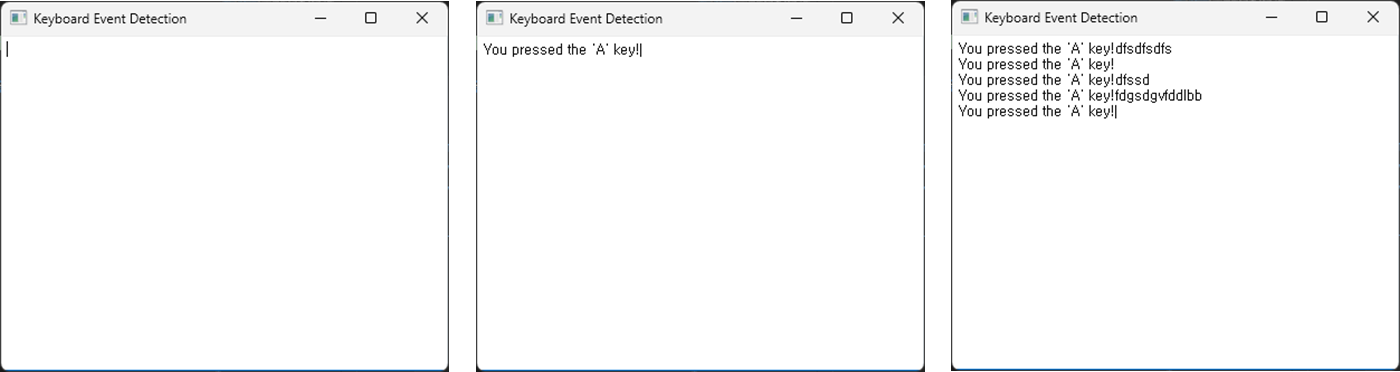
This example displays a message “You pressed the ‘A’ key!” in the text editor when the user presses the ‘A’ key.
CustomTextEditinherits fromQTextEditto add functionality for detecting user keyboard input.keyPressEventis a function that detects and processes keyboard events. In this context, it detects the ‘A’ key input and outputs a message to the text editor.