Zetabank Education Content Logo
latest

Lecture Introduction & Robot Basics

  • Purpose of Lecture
  • AI Robot Convergence Education
    • Educational AI Robot Contents
      • Autonomous Driving SW
      • AI Training Example Contents
      • DIY KIT
      • Variety of Maps
      • Simulation
    • Per-Student Login System
    • Team-Specific Robot Development System
  • Future Convergence Talent
    • Functions of cooperation and communication
    • Lecture Plan and Evaluation Method
      • Lecture Plan
      • Evaluation Method
    • Team Assignment and Collaboration Program
      • Team Assignment
      • Collaboration Program
  • ROS Introduction
    • ROS (Robot Operating System): Navigating the Future of Robotics
    • ROS Components: Assembling the Robotics Ecosystem
    • The Future of ROS: Pioneering Robotic Advancements
  • ――――――――――――――――――――――
  • AI Robot Basic Theory
    • Hardware
      • Ability to converge artificial intelligence with software, robots, and content
      • Transformation robot to respond to various businesses
      • Components of Zetabot
      • Critical Parts
      • Block Diagram
      • Option: 6-axis robot arm
    • ROS 1 (Jetson Nano)
      • Key Traits of ROS 1: Sculpting the Robotic Landscape
    • ROS 2 (Raspberry Pi)
      • Distinctive Traits of ROS 2: Shaping the Future of Robotics
    • Docker
      • Docker’s Components: Assembling the Containerization Landscape
    • JupyterLab
      • JupyterLab’s Distinctive Traits: Shaping the Interactive Experience
  • Assembly AI Robot
    • Assembly Bottom layer
    • Assembly Middle layer
    • Assembly Top layer
    • Option : Intel RealSense D435
  • Control AI Robot
    • Joystick Operation
      • How to Control Robot Using Joystick
    • Interface UI
      • Overall
      • Performing with a robot
      • Catching monsters
      • Artificial Intelligence Education
      • Let’s save robots and the earth
    • RMS (Robot Management System)
      • How to connect
      • How to control the robot
    • JupterLab Access & Run examples
      • How to connect
      • How to run code
    • Organize folders and code
      • Overall
    • Robot Sensor Visualization
      • Accessing Isaac Sight
      • Checking Visuals

AI Education

  • Introduction
  • ――――――――――――――――――――――
  • Artificial Intelligence - Ⅰ
    • Uncertainty in AI
    • Machine Learning
    • Supervised Learning
    • Unsupervised Learning
  • Artificial Intelligence - Ⅱ
    • Neural Networks and Deep Learning
    • CNNs and Visual Recognition
    • Natural Language Processing (NLP)
  • AI Recognition - Ⅰ
    • AI Image Recognition using GoogleNet
      • Follow Along!
      • Overall Explanation
        • Overview
        • GoogleNet
      • Coding Explanation
      • Mission
      • Discussion
    • AI Image Recognition using AlexNet
      • Follow Along!
      • Overall Explanation
        • Overview
        • AlexNet
      • Coding Explanation
      • Mission
      • Discussion
    • How are GoogleNet and AlexNet?
    • Mission Project
      • Writing Python Program as a Team
    • Q&A session
  • AI Object - Ⅱ
    • Object Detection with SSD-Mobilenet-v2
      • Follow Along!
      • Overall Explanation
        • Overview
        • SSD-Mobilenet-v2
        • Other models for Object Detection
      • Coding Explanation
        • Major Functionalities
      • Mission
        • Writing Custom detectNet Program
      • Discussion
  • AI BackgroundNet - Ⅲ
    • Follow Along!
    • Overall Explanation
      • Overview
      • BackgroundNet Model
      • Challenges and Solutions
    • BackgroundNet Coding Explanation
      • Major Functionalities
      • Minor Functionalities
    • Mission
      • Writing Custom Background Removal Program
      • Executing the Custom Program
    • Discussion
      • Group Discussion Points
  • AI Tao - Ⅳ
    • Tao Peoplenet Examples
      • Follow Along!
      • Overall Explanation
        • Overview
        • PeopleNet
      • Coding Explanation
        • Major Functionalities
        • Minor Functionalities
      • Mission
        • Writing Custom segNet Program
        • Executing the Custom Program
      • Discussion
    • Tao Dashcamnet Examples
      • Follow Along!
      • Overall Explanation
        • Overview
        • DashCamNet
      • Coding Explanation
        • Major Functionalities
        • Minor Functionalities
      • Mission
        • Writing Custom segNet Program
        • Executing the Custom Program
      • Discussion
    • Tao Facedetect Examples
      • Follow Along!
      • Overall Explanation
        • Overview
        • FaceDetect
      • Coding Explanation
        • Major Functionalities
        • Minor Functionalities
      • Mission
        • Writing Custom segNet Program
        • Executing the Custom Program
      • Discussion
  • AI PoseNet - Ⅴ
    • Body Pose Estimation with Pose-ResNet18-Body
      • Follow Along!
      • Overall Explanation
        • Overview
        • Pose-ResNet18-Body
      • Coding Explanation
        • Major Functionalities
        • Minor Functionalities
      • Mission
        • Writing Custom poseNet Program
        • Executing the Custom Program
        • Let’s Change the Overlay!!!
      • Discussion
  • AI DepthNet - Ⅵ
    • Sematic Segmentation Examples
      • Follow Along!
        • CityScapes
        • Outdoor (off-road)
        • Segmenting Human Images
        • Variaty Objects and People
        • In-Doors
      • Overall Explanation
        • Overview
        • FCN-ResNet18
      • Coding Explanation
        • Major Functionalities
        • Minor Functionalities
      • Mission
        • Writing Custom segNet Program
        • Executing the Custom Program
      • Discussion
    • Depth Estimation Examples
      • Follow Along!
      • Overall Explanation
        • Overview
        • FCN-MobileNet
      • Coding Explanation
        • Major Functionalities
        • Minor Functionalities
      • Mission
        • Writing Custom DepthNet Program
        • Executing the Custom Program
      • Discussion
    • Q&A session
  • Team DIY AI
    • Create a team AI
    • Transfer the photos you took to the robot
    • Running an AI program on a photo robot
    • Import AI result photos to PC
  • Team AI Mission
  • ――――――――――――――――――――――
  • Team Evaluation (AI)

Robot Control

  • Introduction
  • ――――――――――――――――――――――
  • ROS Terminology
    • Node
    • Package
    • Message
    • Topic
    • Service
    • Action
    • Parameter
  • ROS Python Control - Ⅰ
    • ROS Topic Examples
      • Follow Along!
        • ROS Topic Publisher
        • ROS Topic Subscriber
      • Explanation
        • Topic
        • Nodes
        • Publisher
        • Subscriber
      • Team Mission - ROS Topic
        • Let’s take integer data and find the sum.
        • Let’s chat by sending a string.
        • Let’s separate the string and send it.
        • Let’s re-deliver the received message.
        • Let’s reverse the received message and re-send it (ex. Hello -> olleH)
    • ROS Sensors Examples
      • Follow Along!
        • IMU
        • LIDAR
      • Explanation
        • IMU
        • LIDAR
    • Discussion
    • Q&A session
  • ROS Python Control - Ⅱ
    • Follow Along!
      • ROS Command Example
      • ROS Service Server
      • ROS Service Client
    • Explanation
      • ROS Command Line
        • 1. rosnode command line tool
        • 2. rostopic command line tool
        • 3. pm2 command line tool
      • ROS Service
        • 2. Service proxies
        • 3. Calling services
        • 4. Providing Services
    • Discussion
    • Q&A session
  • ROS Environment Setup
    • ROS Development Environment
      • Ubuntu 18.04
      • Features
      • ROS Melodic
      • Key Features of ROS Melodic
    • Ubuntu Command Line
      • File and Directory Management
      • Text Editing
      • System Information and Management
    • Building ROS Development Environment
    • ROS Command Line
      • ROS Shell Command
  • C / C++ Programming
    • Features of C / C++
      • Efficiency and Simplicity
      • Portability
      • Rich Library Support
      • Procedural and Object-Oriented
      • High-Performance
      • Hardware Control
      • Versatility
      • Compatibility
      • Standard Libraries
      • Smart Memory Management (C++)
    • Object-Oriented Programming
      • Object
      • Procedural vs. Object-Oriented Programming
      • 2. Object-Oriented Programming (OOP)
      • Class and Object
      • Relationship Between Class, Object, and Instance
      • Why Use Classes
      • Procedure-Oriented Programming Example - Python
      • Procedure-Oriented Programming Example - C++
      • Object-Oriented Programming Example - Python
      • Object-Oriented Programming Example - C++
    • How to Install GCC / G++ Compiler
    • How to Run C++ Code in Visual Studio Code
    • C++ Tutorial Examples
      • Hello World
      • Variables and Input/Output
      • Arithmetic Operations
      • Conditional Statements
      • Loops
      • Functions
      • Arrays
      • Strings
      • Pointers
      • Classes and Objects
  • ROS C++
    • Comparing C and C++ Programming Rules
    • Creating a ROS C++ Package
    • ROS C++ Build Settings
  • ROS C++ Practice - Message
    • ROS Publisher and Subscriber Nodes Using C++
  • ROS C++ Practice - Service
    • ROS Service and Client Nodes Using C++
  • ――――――――――――――――――――――
  • Team Evaluation (ROS)

Robot Arm Control

  • Introduction
  • ――――――――――――――――――――――
  • Robot Arm Basics
    • Robot ARM Basics
    • Forward kinematics
    • Inverse kinematics
  • Basic Robot Arm Control
    • Follow Along!
      • Theory
      • Moving the Robot Arm
      • Read Servo Motor Angle
      • Controlling Servo Motors
    • Code Explanation
      • Overall Explanation
      • Robot arm Movements
      • Basic Movements
      • Reading the Current Angle of the Servo
    • Mission Project
      • Libraries used for this Mission
        • mission_lib custom Library
        • event_name custom Library
      • Lets Start the Mission!!!
      • Pick up an object and place it somewhere else!
    • Discussion
    • Q&A session
  • Intermediate Robot Arm Control
    • Follow Along!
      • Dancing with the Robot Arm
      • Gripper Control
      • Robot Arm teaching
    • Code Explanation
      • Teaching the Robot Arm
    • Mission Project
      • Libraries used for this Mission
        • mission_lib_pnp custom Library
        • event_name_pnp custom Library
      • Lets Start the Mission!!!
      • Pick up objects and place them automatically!
    • Discussion
    • Q&A session
  • Advanced Robot Arm Control
    • Follow Along!
      • Tracking a Color with the Robotic Arm
      • Tracking a Face with the Robotic Arm
    • Code Explanation
      • Overall Explanation
      • Tracking a Color
      • Tracking a Face
    • Mission Project
      • Draw a Circle with the Robot Arm
        • Libraries used for this Mission
        • Lets Start the Mission!!!
        • Draw a picture with a robot arm!
      • Draw a Square with the Robot Arm
        • Libraries used for this Mission
        • Lets Start the Mission!!!
        • Draw a picture with a robot arm!
      • Draw a Triangle with the Robot Arm
        • Libraries used for this Mission
        • Lets Start the Mission!!!
        • Draw a picture with a robot arm!
    • Discussion
    • Q&A session
  • Team DIY Project
    • Follow Along!
      • Dancing With Music!
    • Code Explanation
      • Sound
    • Mission Project
      • Libraries used for this Mission
        • time and Arm_Lib Library
        • os Library
      • Lets Start the Mission!!!
      • Make Your Robot Dance to the Music!
    • Discussion
    • Q&A session
  • ――――――――――――――――――――――
  • Team Evaluation (Robot Arm)

Robot System

  • Introduction
  • ――――――――――――――――――――――
  • AI Model Convergence Practice with Depth Camera - Ⅰ
    • Introducing Intel RealSense
      • Intel RealSense D435i
      • Pyrealsense2 Library
    • Follow Along!
      • Convert Depth Image to Text and Output
      • Comparison of Color Images and Depth Images
      • Background Removal Using Depth Image
    • Code Explanation
      • Overall Explanation
      • Structure Explanation - 1
      • Structure Explanation - 2
    • Mission
      • How to Excute the Python File
      • Python File Description
      • Let’s Start the Mission
      • Advanced Mission
    • Discussion
  • AI Model Convergence Practice with Depth Camera - Ⅱ
    • Follow Along!
      • Display Depth Image to Text via Widget
      • Compare Color Image and Depth Image via Widget
      • Detecting object distance using Depth Camera and SSD-Mobilenet
    • Code Explanation
      • Structure Explanation
    • Mission
      • How to Excute the Python File
      • Python File Description
      • Let’s Start the Mission
    • Discussion
  • ――――――――――――――――――――――
  • Team Evaluation (RealSense)

Fusion Coding

  • Introduction
  • ――――――――――――――――――――――
  • Python Introduction
    • Features of Python
      • Python: A Language of Intuitive Expression
      • Simplicity in Grammar: Bridging the Gap
      • Enjoyable Programming: Liberating Creativity
      • The Power of Open Source: Freedom to Create
      • A Fast-Paced Journey: “Life is too short, you need Python”
    • Possibilities of Python
      • Exploring the Boundless Possibilities of Python
      • Artificial Intelligence and Machine Learning: Pioneering the Future
      • Math Programming: The Power of Numpy
      • Data Analysis: Unveiling Insights
      • Database Programming: Accessing and Organizing Data
      • Internet of Things (IoT): Innovating Connectivity
      • Web Programming: Building the Digital Landscape
      • GUI Programming: Visualizing Interaction
      • Crafting System Utilities: Streamlining Operations
      • Synergizing with C/C++: The Glue Language
    • How to Install Python
    • How to Install Visual Studio Code
  • Python Basics
    • Explanation
    • Variables
      • Numeric Variables
      • String Variables
      • List Data Type
      • Tuple Data Type
      • Dictionary Data Type
      • Set Data Type
      • Bool Data Type
    • Control Statements
      • if Statement
      • while Statement
      • for Statement
    • Functions and Classes
      • Functions
      • Classes
    • Follow Along!
      • Variables
        • Numeric Variables
        • String Variables
        • List Data Type
        • Tuple Data Type
        • Dictionary Data Type
        • Set Data Type
        • Bool Data Type
      • Control Statements
        • if Statement
        • while Statement
        • for Statement
      • Functions and Classes
        • Functions
        • Classes
      • Python Coding with ChatGPT
    • Mission
    • Discussion
    • Q&A session
  • Python NumPy Library
    • Explanation
      • Features of NumPy
    • Follow Along!
      • Transpose Matrix Transformation
      • Inverse Matrix Transformation
      • Random Matrix Generation
    • Discussion
    • Q&A session
  • Python OpenCV Library
    • Discussion
    • Q&A session
  • NumPy and OpenCV Fusion Application
    • Explanation
      • Features of NumPy and OpenCV Integration
    • Follow Along!
      • Apply Blur to Image File
      • Crop Image File
      • Edge Detection in Image File
    • Discussion
    • Q&A session
  • Machine Learning and Data Analytics
    • Explanation
      • Features of Machine Learning and Data Analysis
    • Follow Along!
      • Predict Shipwreck Survivors
        • Object
        • Historical Background
        • Data Analysis
        • Protagonist’s Chance of Survival
        • Let’s Change the Protagonist’s Fate
        • Survival Probability Prediction by Room Class
        • Survival Probability Prediction by Gender
      • Stock Analysis and Data Visualization
        • Object
        • Data Analysis
        • Candlestick Chart Visualization
        • Closing Price 20-day Moving Average Visualization
        • Closing Price 60-day Moving Average Visualization
        • Daily Volume Visualization
        • On Balance Volume Indicator Visualization
    • Discussion
    • Q&A session
  • Python with ChatGPT
    • Follow Along!
      • Determine the Cause of the Error
      • Check Code
      • Improve the Quality of Code
      • Comment Out Code That is Difficult to Understand
      • Request Interpretation of Code
      • Request Function Implementation
    • Discussion
    • Q&A session
  • ――――――――――――――――――――――
  • Introduction to PyQT
    • Introduction PyQt5 and GUI Programming
      • PyQt5 and GUI Programming
      • PyQt5: What is it?
      • Features of PyQt5
      • Advantages of PyQt5
    • Basics of GUI and Event-Driven Programming
      • Fundamental Elements of GUI Programming
      • Principles of Event-Driven Programming
    • Setting up and Installing PyQt5
    • Getting Started with PyQt Programming
      • Understanding the PyQt Main Loop
      • Creating a Simple Window
  • Widgets and User Interaction
    • Creating Labels and Buttons
      • Empty Window
      • Label
      • Button
      • Button Clicked
    • Sub Widget Creation
      • Many widget
      • Spin Box
    • Switching Screens: Utilizing the Stacked Widget
      • Detailed Analysis
    • Image Transition: Visualizing Screen Switching
      • Detailed Analysis
  • Advanced Widgets and Interaction
    • Creating Modal and Modeless Dialogs
      • Modal Dialogs
      • Modeless Dialogs
      • Difference between exec_() and show()
        • Block vs Non-Block
        • Return Value
        • Use Cases
    • Using Standard Dialogs
    • Data Model
      • Using Table, List Data Models and View Widgets
        • Table View
        • List View
    • Customizing Widget Appearance
      • Many Widgets
      • Spin box
  • Interaction and Communication
    • Detecting Keyboard Input
      • A Pressed
      • Move Rectangle
    • Mouse Input
    • Keyboard and Mouse Input Detection
    • Explanation:
    • File I/O and Persistence
    • Timer
    • Signals and Slots
  • Customize Widget
    • Creating Custom Widgets
      • Background
      • Slider
      • Drag and Drop
    • Simple Socket Communication
    • Multithreading
      • Single Thread
      • Multi Thread
      • Data Update
      • Progressbar
    • Combining PYQT GUI
      • ChatServer
      • ChatClient
  • Team DIY UI
    • Object
  • Team DIY System
    • Personal Book Management System
    • Household Account Book Management Application
    • Todo List & Scheduler
    • Recipe Management Application
    • Online Ordering Related System
    • Movie Information and Review Management Application
    • Diary Application
    • Puzzle Game
    • Memory Card Match Game
    • Simple Quiz Game
    • Sudoku Game
  • ――――――――――――――――――――――
  • Team Evaluation (Fusion Coding)

Autonomous Driving

  • Introduction
  • ――――――――――――――――――――――
  • Driving the Robot Examples
    • Follow Along!
      • Movement Instructions
      • Movement with Odometry Information
    • Explanation
      • Odometry Information
    • Coding Explanation
      • Robot Movement
        • Initialization
        • Sending commands
        • Combining the movement instructions to a single python function
      • Odometry Information
        • Odometry calculation
        • Starting the Calculation
    • Team Mission - Moving Robot
      • Let’s draw shapes with a robot - 1
      • Let’s draw a circle with a robot
      • Let’s draw shapes with a robot - 2
      • Let’s move the robot by receiving keyboard input.
    • Discussion
  • SLAM and Navigation
    • Introduction
    • Basic Features
      • Map
      • Pose of Robot
      • Sensing
      • Path Calculation and Driving
    • Theory
      • Slam Theory
        • Particle filter
      • Navigation Theory
        • Costmap
        • AMCL
        • Dynamic Window Approach (DWA)
    • Mission
      • How to do the Mission
        • Constructing a Map (as a Team)
        • Mapping the Constructed Map
        • Executing Navigation
        • Team Competition
      • Other Mission Examples
        • Get coordinate information, Send to desired coordinate
        • Map Examples
    • Discussion
    • Q&A session
  • Autonomous Driving Robot Part Ⅰ
    • Intro - Model C
    • Components
      • Front Side
      • Back Side
      • Top View
    • Using GUI
      • Start
      • Bringup
      • M-LRF
      • OP
      • Navigation
      • NaviRVIZ
      • WPCtrl
      • InitPos
      • Motion Ctrl
      • Run TeleOP
      • Sonar Sensor
      • Navigate Way Points
      • Navigate Trajectories
      • Parking C.S.
      • Air Information
      • Air Purifier
      • Configuration
      • Cam View
      • RS View
      • AMCL Pos
      • UVC
      • Control LED-bar
      • Ready
      • Mapping
      • RosBoard
  • Autonomous Driving Robot Part Ⅱ
    • Node configuration
      • Path Planner
      • /scan
      • /tf
      • Diagram
      • Node Graph
      • Additional explanation
    • Automatic Charging
      • Component
      • Process
      • Algorithm
    • Service Application
      • App Screen
      • Route guidance function using autonomous driving
    • Use Cases
      • Gwangju Biennale
      • Daegu Exco
      • Daegu Exhibition
      • Daegu City Hall Annex Cafe
    • Design
  • ――――――――――――――――――――――
  • Team Evaluation (Autonomous Driving)

Problem Solving

  • Introduction
  • ――――――――――――――――――――――
  • Issue Analysis Project: Hardware
  • Issue Analysis Project: Megatech
  • Issue Analysis Project: Mobility
  • Issue Analysis Project: Transform
  • Midterm Team Testing

Cooperation

  • Introduction
  • ――――――――――――――――――――――
  • Team Code Analysis
    • Part 1. Easy
    • Part 2. Intermediate
    • Part 3. Hard
  • 7 Minutes Mission
    • Part 1. Easy
    • Part 2. Intermediate
    • Part 3. Hard
  • Team GAME Section
    • Virtual Avoid Particle Game
      • How To Play
      • Code Analysis
    • Gesture Snake Game
      • How To Play
      • Code Analysis
    • Virtual Avoid Particle Game
      • How To Play
      • Code Analysis

Application Cases

  • Use Cases
    • Zetabank Model-D
    • Zetabank Model-C
    • Zetabank Model-I
Zetabank Education Content
  • Autonomous Driving Robot Part Ⅰ
  • Using GUI
  • Navigate Trajectories
  • Edit on GitHub

Navigate Trajectories

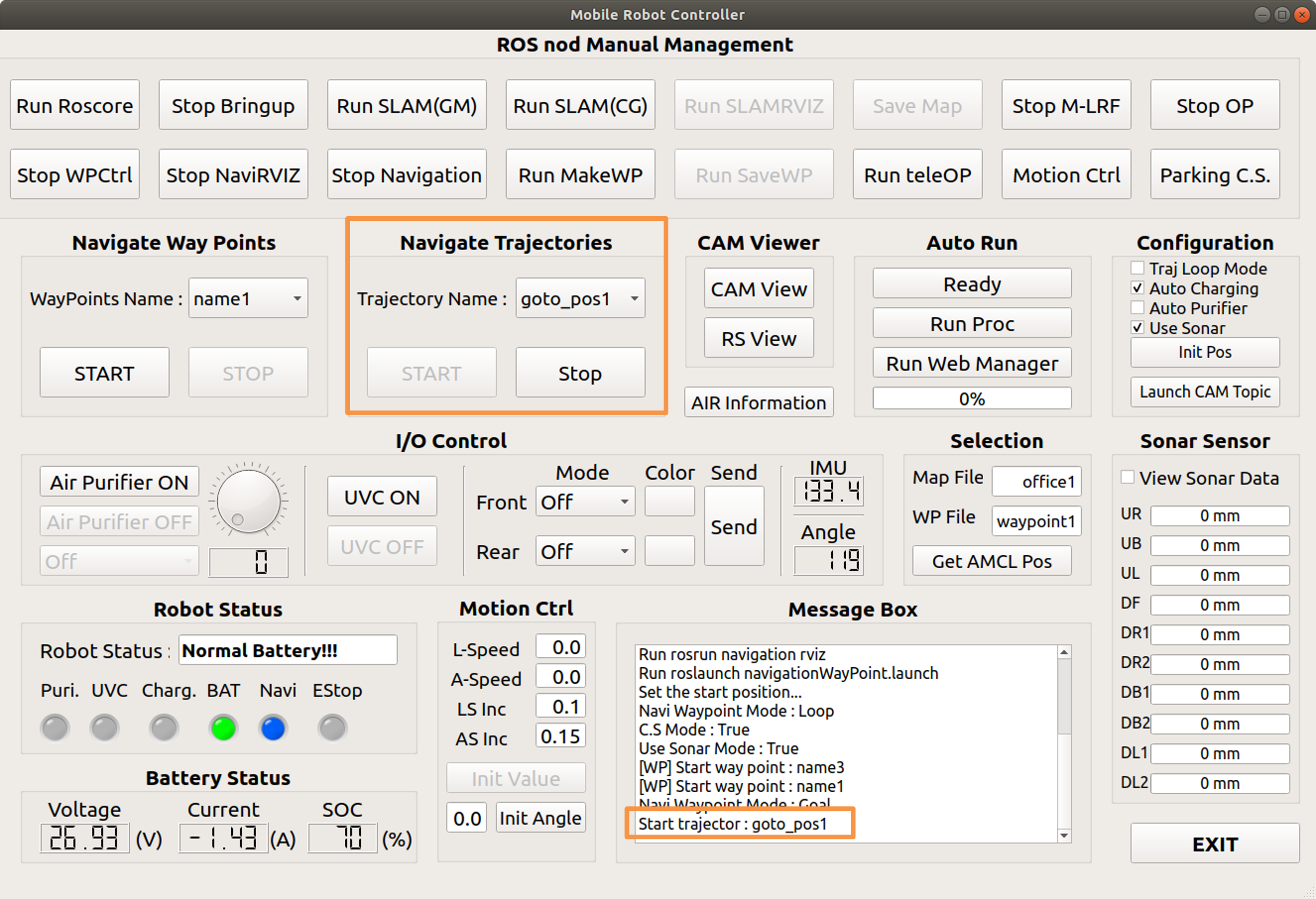
Driving by selecting a pre-registered trajectory from the drop-down menu

Desired coordinates are registered in trajectories, and it travels through these coordinates in order.


GUI execution screen when button is clicked

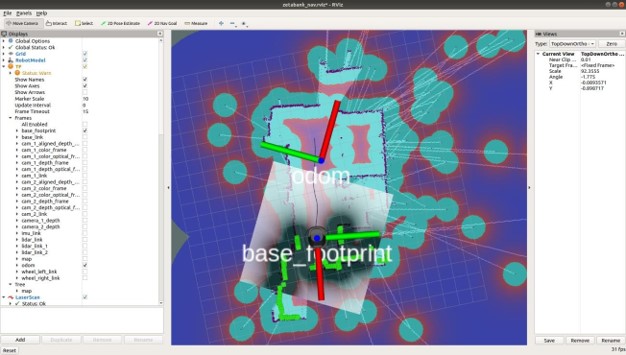
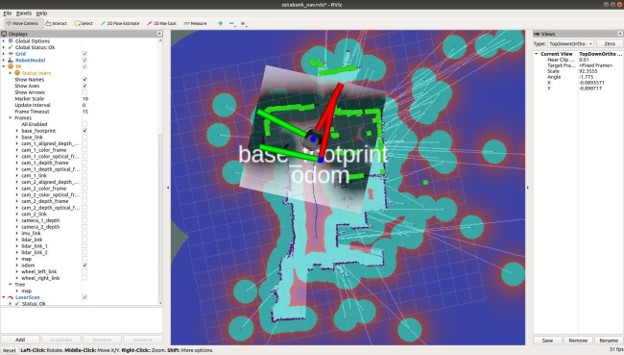
RVIZ execution screen when button is clicked
Previous Next

© Copyright . Revision 6621d20e.

Built with Sphinx using a theme provided by Read the Docs.