Data Update
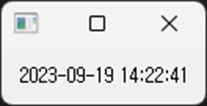
This program creates a simple PyQt5 widget that updates the current time in real-time. The widget displays the current time, updating every second.
# -*- coding: utf-8 -*-

import sys
from PyQt5.QtWidgets import QApplication, QLabel, QVBoxLayout, QWidget
from PyQt5.QtCore import QTimer, QDateTime

class TimeUpdateWidget(QWidget):
    def __init__(self):
        super(TimeUpdateWidget, self).__init__()

        self.initUI()

        # QTimer 객체 생성
        self.timer = QTimer(self)
        self.timer.timeout.connect(self.update_time)  # 타이머 시간이 끝날 때마다 update_time 함수 호출
        self.timer.start(1000)  # 1초마다 타이머 시작

    def initUI(self):
        self.label = QLabel(self)
        layout = QVBoxLayout()
        layout.addWidget(self.label)
        self.setLayout(layout)


    def update_time(self):
        current_time = QDateTime.currentDateTime().toString('yyyy-MM-dd hh:mm:ss')
        self.label.setText(current_time)

if __name__ == "__main__":
    app = QApplication([])
    mainWindow = TimeUpdateWidget()
    mainWindow.show()
    app.exec_()
QTimer: This class emits a signal at a given time interval. In this context, it emits thetimeoutsignal every second, triggering theupdate_timefunction.update_timefunction: This function fetches the current time and displays it on the label.