Follow Along!
Follow along: Robot Movement Examples
- Movement Instructions
- Movement Instructions with Odometry Information
Movement Instructions
Open the provided jupyter notebook
01_wheel.ipynb
- Running the cell codeCtrl + Enter
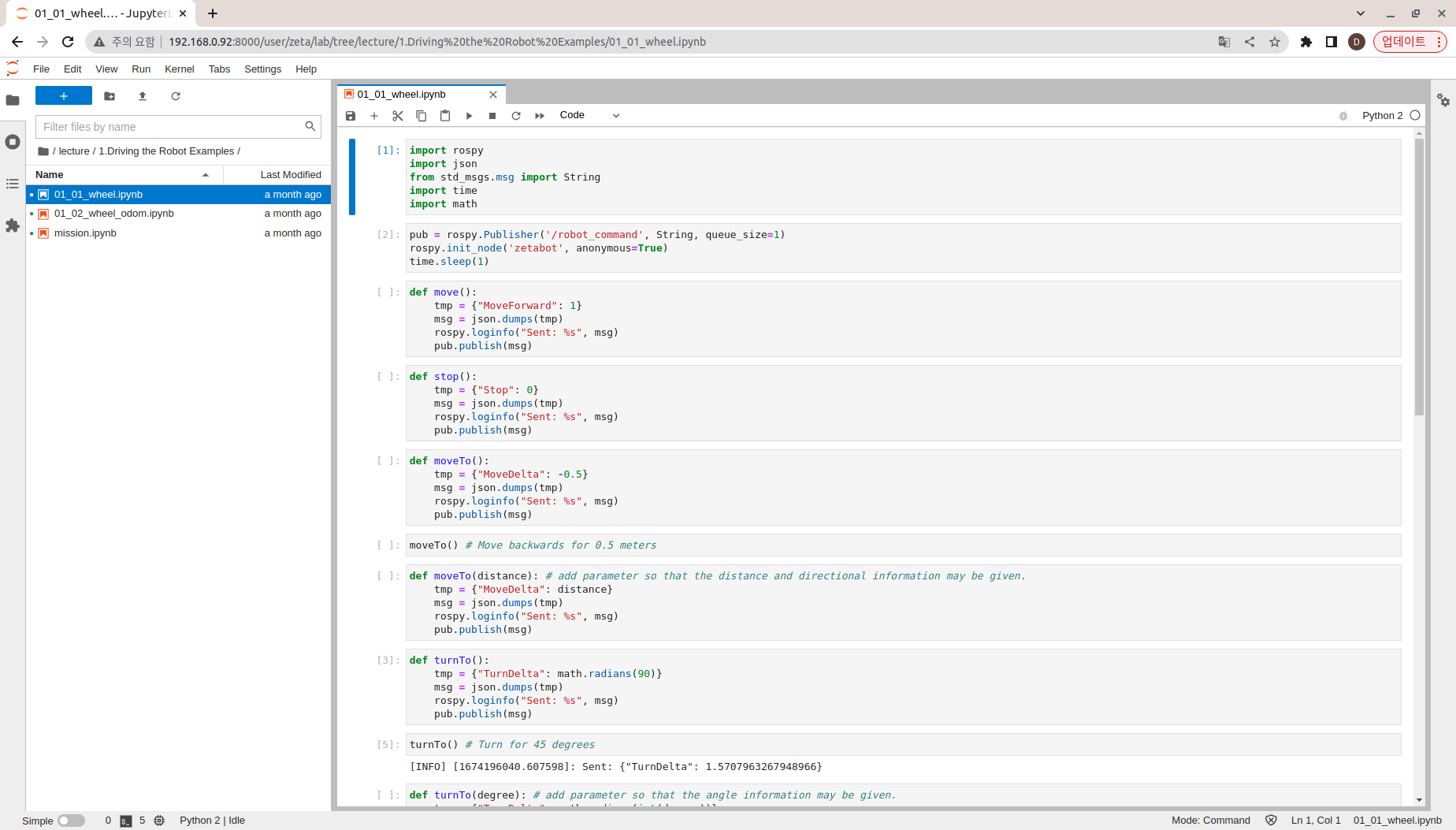
Import the necessary libraries
import rospy
import json
from std_msgs.msg import String
import time
import math
Create zetabot node with ros publisher. This will allow us to have object to control the movements of our robot.
Create robot_command Topic Publisher object.
pub = rospy.Publisher('/robot_command', String, queue_size=1)
rospy.init_node('zetabot', anonymous=True)
time.sleep(1)
Create a move() function
Convert {“MoveForward”: 1} to Json String
Publish the converted message
def move():
    tmp = {"MoveForward": 1}
    msg = json.dumps(tmp)
    rospy.loginfo("Sent: %s", msg)
    pub.publish(msg)
Create stop() function
Convert {“Stop”: 0} to Json String
Publish the converted message
def stop():
    tmp = {"Stop": 0}
    msg = json.dumps(tmp)
    rospy.loginfo("Sent: %s", msg)
    pub.publish(msg)
Create a moveTo() function
Convert {“MoveDelta”: -0.5} to Json String
Publish the converted message
def moveTo():
    tmp = {"MoveDelta": -0.5}
    msg = json.dumps(tmp)
    rospy.loginfo("Sent: %s", msg)
    pub.publish(msg)
Execute the moveTo() function which will move the robot backwards for 0.5 meters
moveTo() # Move backwards for 0.5 meters
On top of moveTo() function, add distance parameter so that distance and directional information may be given.
def moveTo(distance):
    tmp = {"MoveDelta": distance}
    msg = json.dumps(tmp)
    rospy.loginfo("Sent: %s", msg)
    pub.publish(msg)
Create turnTo() function
Convert 45° to radians
Convert {“TurnDelta”: math.radians(45)} to Json string
Publish the converted message
def turnTo():
    tmp = {"TurnDelta": math.radians(45)}
    msg = json.dumps(tmp)
    rospy.loginfo("Sent: %s", msg)
    pub.publish(msg)
Execute the turnTo() function which will turn the robot 45 degrees of angle from its initial position.
turnTo()
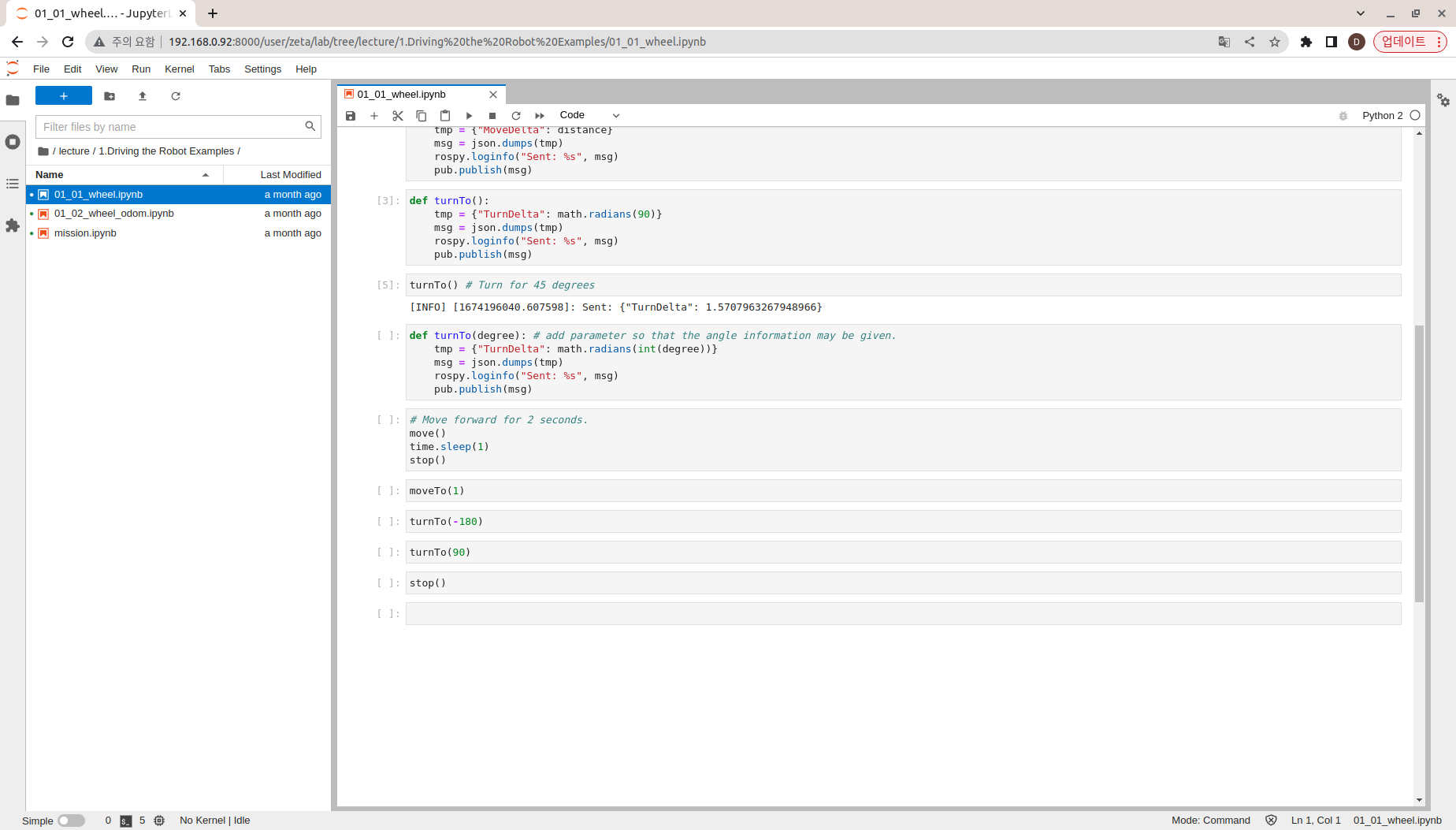
On top of turnTo() function, add degree parameter so that we may specify how much to turn the robot.
def turnTo(degree):
    tmp = {"TurnDelta": math.radians(int(degree))}
    msg = json.dumps(tmp)
    rospy.loginfo("Sent: %s", msg)
    pub.publish(msg)
Run the move() function
2 second time delay
Run the stop() function
move()
time.sleep(2)
stop()
Execute the moveTo(distance) function
1 distance forward
moveTo(1)
Run the turnTo(degree) function
170 degree rotation
turnTo(170)
Run the turnTo(degree) function
25 degree rotation
turnTo(25)
Movement with Odometry Information
Open the jupyter notebook
02_wheel_odom.ipynb
- Running the cell codeCtrl + Enter
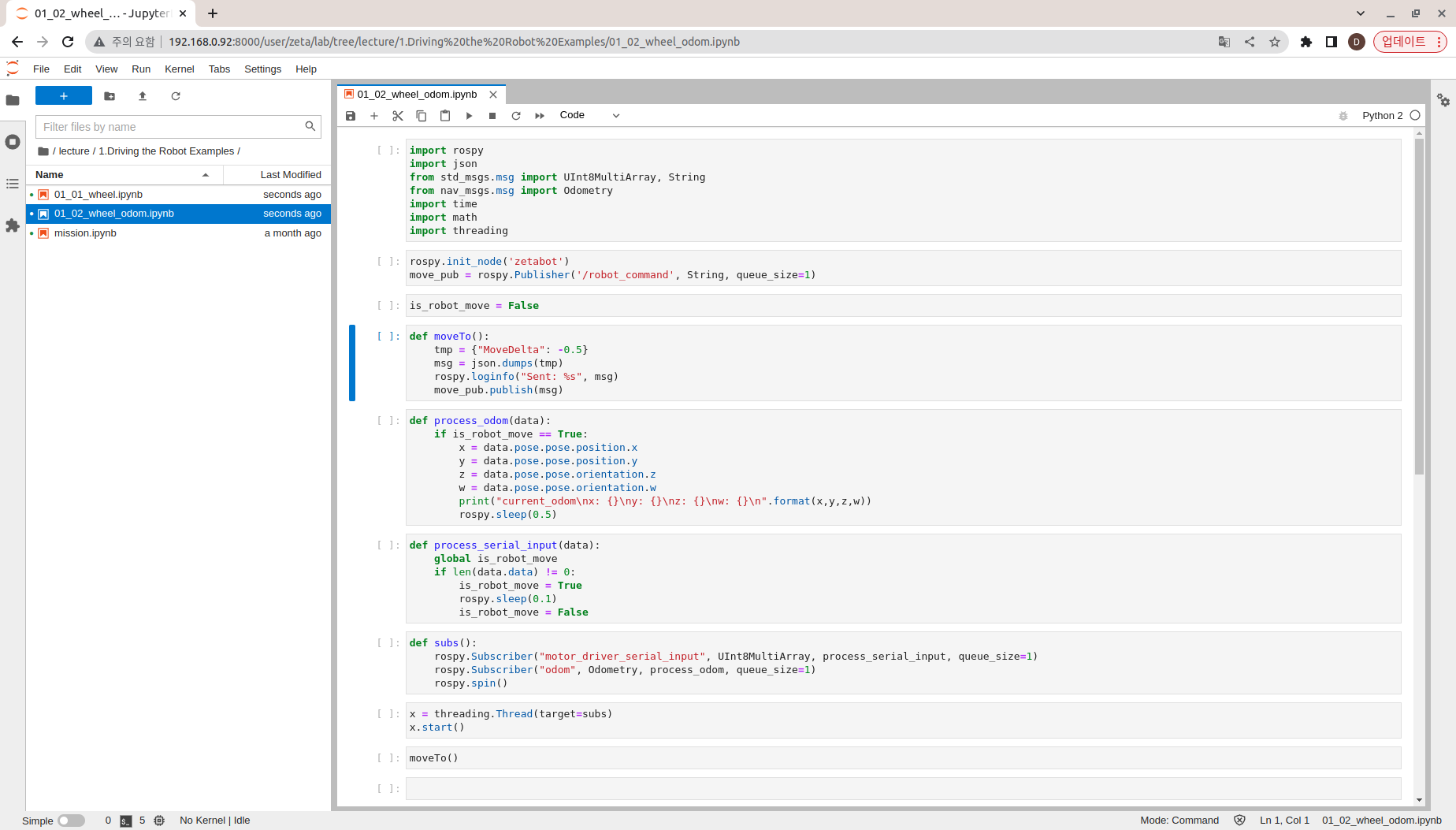
Import the necessary libraries.
import rospy
import json
from std_msgs.msg import UInt8MultiArray, String
from nav_msgs.msg import Odometry
import time
import math
import threading
Create zetabot node with ros publisher. This will allow us to have object to control the movements of our robot.
Create robot_command Topic Publisher object.
rospy.init_node('zetabot')
move_pub = rospy.Publisher('/robot_command', String, queue_size=1)
Set the is_robot_move variable to False
is_robot_move = False
Create a moveTo() function
Convert {“MoveDelta”: -0.5} to Json String
Publish the converted message
def moveTo():
    tmp = {"MoveDelta": 0.5}
    msg = json.dumps(tmp)
    rospy.loginfo("Sent: %s", msg)
    move_pub.publish(msg)
Create process_odom(data) function
If is_robot_move variable is True, output x, y, z, w values of odom Topic
def process_odom(data):
    if is_robot_move == True:
        x = data.pose.pose.position.x
        y = data.pose.pose.positioan.y
        z = data.pose.pose.orientation.z
        w = data.pose.pose.orientation.w
        print("current_odom\nx: {}\ny: {}\nz: {}\nw: {}\n".format(x,y,z,w))
        rospy.sleep(0.5)
Create process_serial_input(data) function
If the length of motor_driver_serial_input Topic is not 0, set is_robot_move variable to True
Set the is_robot_move variable to False after a 0.1 second time delay
def process_serial_input(data):
    global is_robot_move
    if len(data.data) != 0:
        is_robot_move = True
        rospy.sleep(0.1)
        is_robot_move = False
Create subs function
Create motor_driver_serial_input Topic Subscriber
Create an odom Topic Subscriber
def subs():
    rospy.Subscriber("motor_driver_serial_input", UInt8MultiArray, process_serial_input, queue_size=1)
    rospy.Subscriber("odom", Odometry, process_odom, queue_size=1)
    rospy.spin()
Assign the subs() function to Thread
Thread execution
x = threading.Thread(target=subs)
x.start()
Run the moveTo() function
moveTo()