Signals and Slots
One of the central features of PyQt is the signal and slot mechanism.
Widgets and other objects can connect events (signals) to functions (slots) that process them.
# -*- coding: utf-8 -*-

import sys
from PyQt5.QtWidgets import QApplication, QMainWindow, QTextEdit
from PyQt5.QtCore import Qt, pyqtSignal

class SignalTextEdit(QTextEdit):
    b_key_pressed = pyqtSignal()

    def __init__(self, parent=None):
        super(SignalTextEdit, self).__init__(parent)
        self.b_key_pressed.connect(self.on_b_key_pressed)

    def keyPressEvent(self, event):
        if event.key() == Qt.Key_B:
            self.b_key_pressed.emit()
        else:
            super(SignalTextEdit, self).keyPressEvent(event)

    def on_b_key_pressed(self):
        self.append("You pressed the 'B' key!")

class SignalApp(QMainWindow):
    def __init__(self):
        super(SignalApp, self).__init__()

        self.text_edit = SignalTextEdit(self)
        self.setCentralWidget(self.text_edit)

        self.init_ui()

    def init_ui(self):
        self.setWindowTitle('Signal and Slot Example')
        self.setGeometry(100, 100, 400, 300)

if __name__ == '__main__':
    app = QApplication(sys.argv)
    window = SignalApp()
    window.show()
    sys.exit(app.exec_())
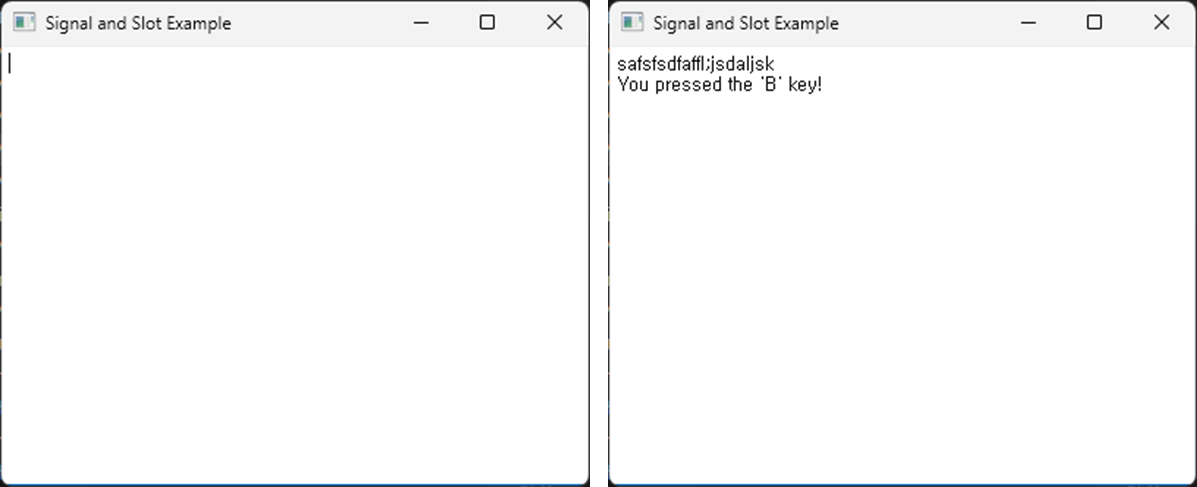
This script demonstrates an application that detects keyboard input using the PyQt5 signal and slot mechanism.
Differences from 01_key_pressed/01_A_pressed/main.py:
- Event handling approach:
The given example directly redefines keyPressEvent to detect the ‘A’ key.
scripts/PYQT4/06_signal_and_slot/main.pyuses a custom signal and slot mechanism to detect the ‘B’ key.
- Flexibility:
The signal and slot mechanism offers higher flexibility as multiple signals can be connected to multiple slots. This makes it more suitable when considering complex interactions or extensibility.
Direct event handling is simple and intuitive and is suitable for simpler interactions.