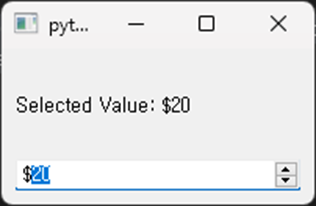
Spin Box
This example demonstrates how to use the QSpinBox widget:
 1# -*- coding: utf-8 -*-
 2
 3import sys
 4from PyQt5.QtWidgets import QApplication, QMainWindow, QSpinBox, QVBoxLayout, QWidget, QLabel
 5
 6class SpinBoxExample(QMainWindow):
 7    def __init__(self):
 8        super(SpinBoxExample, self).__init__()
 9
10        self.init_ui()
11
12    def init_ui(self):
13        layout = QVBoxLayout()
14
15        self.label = QLabel("Selected Value:", self)
16
17        self.spin_box = QSpinBox(self)
18        self.spin_box.setRange(0, 100)  # 0부터 100까지의 범위 설정
19        self.spin_box.setSingleStep(5)  # 5단위로 값 변경
20        self.spin_box.setPrefix("$")    # 접두사로 달러 표시
21        self.spin_box.valueChanged.connect(self.update_label)  # 값 변경 시 라벨 업데이트
22
23        layout.addWidget(self.label)
24        layout.addWidget(self.spin_box)
25
26        container = QWidget()
27        container.setLayout(layout)
28        self.setCentralWidget(container)
29
30    def update_label(self, value):
31        self.label.setText("Selected Value: ${}".format(value))
32
33if __name__ == '__main__':
34    app = QApplication(sys.argv)
35    window = SpinBoxExample()
36    window.show()
37    sys.exit(app.exec_())
QSpinBox: A widget that allows the user to input an integer value. Users can click the arrows within the widget or directly input numbers to change the value.In this example, the
QSpinBoxranges from 0 to 100, adjusting in increments of 5. It also prefixes the displayed value with the ‘$’ sign. When the user changes the value, the connected slot functionupdate_labelis invoked to update the text of the label widget.